
Screenshot 1:

Step 2: Click on servers > server types > Web server
Already on one webserver on Port 443 & 80 is working.
Screenshot 2 :

Step 3: To Create a New webserver [ NEW_webserver ] in mycase .
Click on New..
Screenshot 3 :

Step 4: Provide a server name > Next .
Screenshot 4:

Step 5: Default IHS selected > Next .
Screenshot 5:

Step 6: Provide NEW port no [ 5080 for http ] in mycase >> Next
Screenshot 6:

Step 7: Review Summary >> Finish .
Screenshot 7:

Step 8: Click on Review.
Screenshot 8:

Step 9: Select Synchronize changes with Nodes >> Save >> OK .
Screenshot 9:

Step 10 : Now we have created the NEW_webserver , with status stopped.
Screenshot 10 :

Step 11 : Copy the working http.conf with [ NEWhttp.conf ] in my case.
Screenshot 11:

Step 12 : Open the Newhttp.conf and make changes.
1 >> PID File Location
2 >> Error logs location.
3 >> Access logs location.
4 >> Servername
5 >> Listen Address From (:80 ) and ( :443 ) to (5080) and (50443) in mycase.
6 >> Virtual host port and ipaddress.
7 >> New Webserver Plugin file location.
Screenshot 12-1 :

Screenshot 12-1 :

Step 13 : Use Diff command to check the Diffrence between them.
Screenshot 13:

Step 14: Make a new folder of NEWlogs on IHS home .
Screenshot 14:
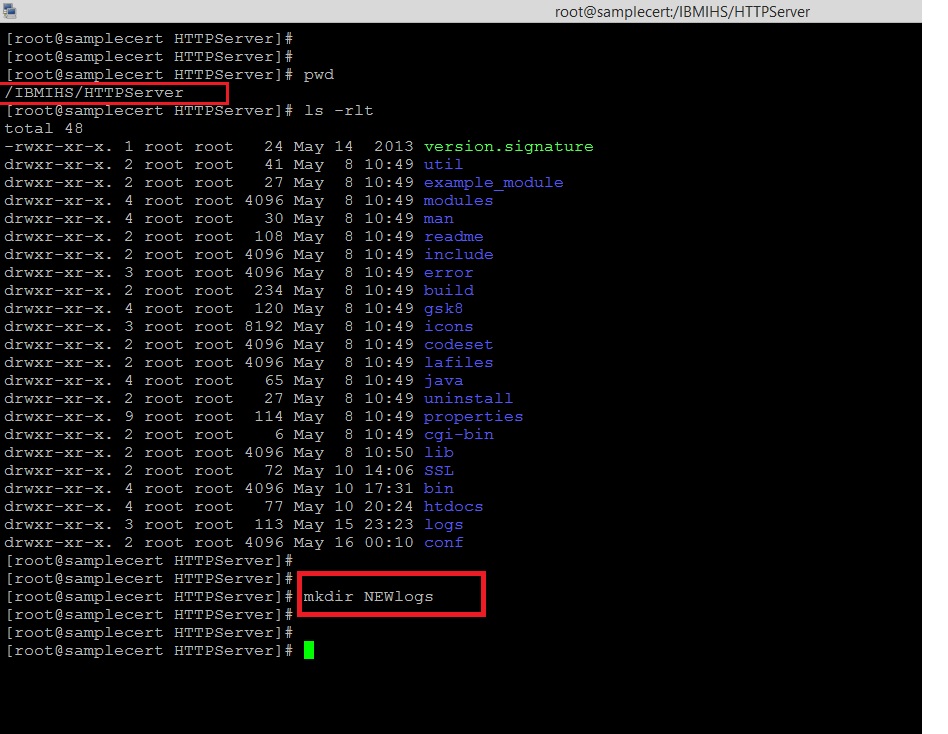
Step 15 : go to Webserver > NEW_webserver >> Configuration file name > Apply > Review > Synchronize changes with Nodes > Save.

Change the paramerts from console also.
Screenshot 15:
Step 16 : Changes in log file from console >> Apply > Review > Synchronize changes with Nodes > Save.
Screenshot 16-1:

Screenshot 16-2:

Step 17 : Review Virtual Hosts from Console >>
Screenshot 17:

Step 18 : Add Virtual Hosts from Console .
Environment > Virtual Hosts > default_host > Host Aliases
Screenshot 18-1 :

Screenshot 18-2 : Add a new Virtual Hosts Port : (5080) and (50443)

Step 19: Add 5080 and 50443 >> >> Apply > Review > Synchronize changes with Nodes > Save.
Screenshot 19 -1:

Screenshot 19-2:

Step 20: Review host entries.
Screenshot 20:

Step 21: Select Enterprise Applications > calendar_war > Virtual hosts > select default_host > OK.
Screenshot 21:

Step 22 : Now Start the NEW_webserver from shell.
Screenshot 22:

Step 23: Generate and Propagate plugins from console.
Screenshot 23:

Step 24 : Manage the deployed application from console.
Screenshot 24:

Clear the logs and Restart the Application.
Step 25 : Check the IHS at port 5080
Screenshot 25:

Step 26 : Check the calendar.war Application at port 5080
Screenshot 26:

Step 27 : Check the IHS at port 50443
Screenshot 27:

Step 28 : Check the calendar.war Application at port 50443
Screenshot 28-1:

Screenshot 28-2:

Thanks :-) Middleware Team :-) !

Been messing with multiple IHS in front of WAS myself and this step-by-step guide really makes the whole process less painful. Setting up new ports and syncing nodes always feels scary at first, but following it closely helped me avoid downtime. Also found it handy to double-check the http.conf changes. For anyone trying this, make sure to test everything on the new ports before going live. For related stuff, you can check kolkata ff.
ReplyDelete