Menu

Showing posts with label Apache. Show all posts

2 Nov 2025

πŸ’Ύ Shell Scripting for Beginners – Part 12: Backup & Restore Automation Project (DevOps & Middleware Edition)

  • Here we'll automate backup and restore tasks for real middleware & DevOps systems like Jenkins, Tomcat, WebSphere, MySQL, Docker, and Apache.
  • Each example includes a working restore script and troubleshooting tips. ⚙️

πŸ“‘ Table of Contents


1️⃣ Jenkins Backup & Restore

#!/bin/bash
JENKINS_HOME="/var/lib/jenkins"
BACKUP_DIR="/opt/backups/jenkins"
mkdir -p $BACKUP_DIR
tar -czf $BACKUP_DIR/jenkins_$(date +%F_%H-%M).tar.gz -C $JENKINS_HOME .
echo "✅ Jenkins backup created in $BACKUP_DIR"

♻️ Restore Jenkins

#!/bin/bash
BACKUP_FILE="/opt/backups/jenkins/jenkins_2025-11-02_02-10.tar.gz"
service jenkins stop
tar -xzf "$BACKUP_FILE" -C /var/lib/jenkins
chown -R jenkins:jenkins /var/lib/jenkins
service jenkins start
echo "♻️ Jenkins restored successfully."

2️⃣ Tomcat Backup & Restore

#!/bin/bash
TOMCAT_HOME="/opt/tomcat"
BACKUP_DIR="/opt/backups/tomcat"
mkdir -p $BACKUP_DIR
tar -czf $BACKUP_DIR/tomcat_$(date +%F).tar.gz $TOMCAT_HOME/webapps $TOMCAT_HOME/conf
echo "πŸ“¦ Tomcat backup completed."

♻️ Restore Tomcat

#!/bin/bash
BACKUP_FILE="/opt/backups/tomcat/tomcat_2025-11-02.tar.gz"
service tomcat stop
tar -xzf "$BACKUP_FILE" -C /
service tomcat start
echo "♻️ Tomcat restored and restarted."

3️⃣ WebSphere Backup & Restore

#!/bin/bash
WAS_PROFILE="/opt/IBM/WebSphere/AppServer/profiles/AppSrv01"
BACKUP_DIR="/opt/backups/websphere"
mkdir -p $BACKUP_DIR
tar -czf $BACKUP_DIR/was_$(date +%F_%H-%M).tar.gz -C $WAS_PROFILE .
echo "πŸ“ WebSphere configuration backup done."

♻️ Restore WebSphere

#!/bin/bash
BACKUP_FILE="/opt/backups/websphere/was_2025-11-02_03-00.tar.gz"
service was stop
tar -xzf "$BACKUP_FILE" -C /opt/IBM/WebSphere/AppServer/profiles/AppSrv01
service was start
echo "♻️ WebSphere restored successfully."

4️⃣ MySQL Database Backup & Restore

#!/bin/bash
DB="middlewaredb"
USER="root"
PASS="Secret123"
BACKUP_DIR="/opt/backups/mysql"
mkdir -p $BACKUP_DIR
mysqldump -u $USER -p$PASS $DB > $BACKUP_DIR/${DB}_$(date +%F).sql
gzip $BACKUP_DIR/${DB}_$(date +%F).sql
echo "πŸ—„️ MySQL backup completed."

♻️ Restore MySQL

#!/bin/bash
BACKUP_FILE="/opt/backups/mysql/middlewaredb_2025-11-02.sql.gz"
gunzip "$BACKUP_FILE"
mysql -u root -pSecret123 middlewaredb < /opt/backups/mysql/middlewaredb_2025-11-02.sql
echo "✅ Database restored successfully."

5️⃣ Docker Containers Backup & Restore

#!/bin/bash
BACKUP_DIR="/opt/backups/docker"
mkdir -p $BACKUP_DIR
for cid in $(docker ps -q); do
  cname=$(docker inspect --format='{{.Name}}' $cid | cut -d'/' -f2)
  docker export $cid > $BACKUP_DIR/${cname}_$(date +%F).tar
done
echo "🐳 Docker containers exported successfully."

♻️ Restore Docker Container

#!/bin/bash
BACKUP_FILE="/opt/backups/docker/myapp_2025-11-02.tar"
docker import "$BACKUP_FILE" myapp_restored:latest
docker run -d --name myapp_restored myapp_restored:latest
echo "♻️ Docker container restored and running."

6️⃣ Apache Webserver Backup & Restore

#!/bin/bash
BACKUP_DIR="/opt/backups/apache"
mkdir -p $BACKUP_DIR
tar -czf $BACKUP_DIR/apache_$(date +%F).tar.gz /etc/apache2 /var/www/html /etc/ssl
echo "🌐 Apache configuration, website, and SSL backed up."

♻️ Restore Apache

#!/bin/bash
BACKUP_FILE="/opt/backups/apache/apache_2025-11-02.tar.gz"
tar -xzf "$BACKUP_FILE" -C /
service apache2 restart
echo "✅ Apache restored and running."

7️⃣ Automating Backups

Schedule automatic backups using cron so your systems stay protected 24×7.

# Run daily at 2 AM
0 2 * * * /opt/scripts/backup_all.sh >> /var/log/backup_all.log 2>&1

# Run on every reboot
@reboot /opt/scripts/backup_all.sh >> /var/log/backup_boot.log 2>&1
πŸ’¬ Output:
[CRON] Scheduled backup started…
✅ Jenkins, Tomcat, WebSphere, MySQL, Docker, Apache backed up successfully.

🧠 Pro Tips & Troubleshooting

✅ General Best Practices

  • Use a dedicated /opt/backups partition or NFS mount to avoid filling system drives.
  • Compress large backups with gzip or zstd [Developed by Meta] for better space efficiency.
  • Store daily, weekly, and monthly copies separately (retention policy).
  • Automate restores in a test environment weekly to ensure recovery works.

⚙️ Troubleshooting Common Issues

  • Permission Denied: Run backups as sudo or fix ownership using chown.
  • πŸ“¦ Disk Full: Use df -h to check space before backup. Add cleanup logic for old files.
  • 🧾 Log Rotation: Add logrotate entry to keep backup logs small and readable.

🏁 Summary

  • ✅ Full backup & restore automation for all major middleware and DevOps tools.
  • 🧩 Scripts are modular, reusable, and easy to integrate in CI/CD pipelines.
  • ⚙️ Cron ensures zero manual intervention for daily protection.

1 Nov 2025

🧾 Shell Scripting for Beginners – Part 11: Log Management & Rotation for Middleware & DevOps Projects

  • Logs are the heartbeat of your servers πŸ’“ — but if left unmanaged, they'll crash your systems.
  • In this part, you'll learn how to clean, compress, and rotate logs for Tomcat, Jenkins, Apache, Docker, Kubernetes, and system services using shell scripts and logrotate.

πŸ“‘ Table of Contents


1️⃣ Log Cleanup Scripts

#!/bin/bash
# Delete logs older than 7 days for Tomcat & Jenkins
find /opt/tomcat/logs/ -type f -name "*.log" -mtime +7 -exec rm -f {} \;
find /var/log/jenkins/ -type f -name "*.log" -mtime +7 -exec rm -f {} \;
echo "🧹 Tomcat & Jenkins logs older than 7 days removed!"
πŸ’¬ Output:
🧹 Tomcat & Jenkins logs older than 7 days removed!

2️⃣ Apache & Middleware Examples

#!/bin/bash
ARCHIVE="/opt/log_archive/apache"
mkdir -p $ARCHIVE
find /var/log/apache2/ -type f -name "*.log" -mtime +3 -exec gzip {} \;
mv /var/log/apache2/*.gz $ARCHIVE 2>/dev/null
echo "πŸ“¦ Apache logs compressed and archived in $ARCHIVE"
πŸ’¬ Output:
πŸ“¦ Apache logs compressed and archived in /opt/log_archive/apache

3️⃣ Docker & Kubernetes Log Cleanup

#!/bin/bash
echo "🐳 Cleaning Docker & K8s logs..."
docker system prune -af
find /var/log/containers/ -type f -name "*.log" -mtime +5 -exec rm -f {} \;
echo "✅ Docker and Kubernetes logs cleaned!"
πŸ’¬ Output:
✅ Docker and Kubernetes logs cleaned!

4️⃣ logrotate Configuration

# /etc/logrotate.d/devops-services
/opt/tomcat/logs/*.log
/var/log/apache2/*.log
/var/lib/jenkins/logs/*.log
/var/log/docker/*.log {
    weekly
    rotate 6
    compress
    missingok
    notifempty
    sharedscripts
    postrotate
        systemctl reload apache2 2>/dev/null || true
        systemctl restart tomcat 2>/dev/null || true
    endscript
}
πŸ’¬ Result:
πŸ” Logs for Apache, Tomcat, Jenkins, and Docker will rotate weekly and auto-restart services.

5️⃣ How to Run & Test logrotate

Once your config is ready, you can run logrotate manually or let cron handle it.

🧠 Step 1 – Check Syntax of Your Config

sudo logrotate -d /etc/logrotate.d/devops-services
πŸ’¬ Output:
Reading config file /etc/logrotate.d/devops-services
Handling /opt/tomcat/logs/*.log
Handling /var/log/apache2/*.log
**dry-run mode (no rotation performed)**

⚙️ Step 2 – Run logrotate Manually

sudo logrotate -f /etc/logrotate.d/devops-services
πŸ’¬ Output:
Rotating logs for Tomcat, Apache, Jenkins...
Compression complete.
Rotation successful ✅

⏰ Step 3 – Schedule via Cron (Daily or Weekly)

# /etc/cron.daily/logrotate
/usr/sbin/logrotate /etc/logrotate.conf

πŸ’‘ By default, most Linux systems already run logrotate daily using this cron job. You can verify the last run log at /var/lib/logrotate/status.


🏁 Summary

  • ✅ Cleaned and archived logs for Tomcat, Jenkins, Apache, Docker, and K8s.
  • ✅ Created unified logrotate configuration.
  • ✅ Learned to manually test (-d) and force-run (-f) logrotate.
  • ✅ Automated rotation through cron for 24×7 log hygiene.

12 Apr 2021

SSL certificate supports Weak Ciphers/Encoding (3DES) (Apache 2.4 REDHAT)

Environment: Apache 2.4 (Linux)

Note: Take backup of /conf directives.

1. Locate to FileName: ssl.conf / http-ssl.conf file 


2. Add below parameters in virtual-host tag of  ssl.conf / http-ssl.conf with SSL Protocol.

(only TLSv1.2 is enabled)


*************************************************

SSLProtocol All -SSLv2 -SSLv3 -TLSv1 -TLSv1.1


SSLCipherSuite ECDHE-RSA-AES128-GCM-SHA256:ECDHE-ECDSA-AES128-GCM-SHA256:ECDHE-RSA-AES256-GCM-SHA384:ECDHE-ECDSA-AES256-GCM-SHA384:DHE-RSA-AES128-GCM-SHA256:DHE-DSS-AES128-GCM-SHA256:kEDH+AESGCM:ECDHE-RSA-AES128-SHA256:ECDHE-ECDSA-AES128-SHA256:ECDHE-RSA-AES128-SHA:ECDHE-ECDSA-AES128-SHA:ECDHE-RSA-AES256-SHA384:ECDHE-ECDSA-AES256-SHA384:ECDHE-RSA-AES256-SHA:ECDHE-ECDSA-AES256-SHA:DHE-RSA-AES128-SHA256:DHE-RSA-AES128-SHA:DHE-DSS-AES128-SHA256:DHE-RSA-AES256-SHA256:DHE-DSS-AES256-SHA:DHE-RSA-AES256-SHA:!aNULL:!eNULL:!EXPORT:!DES:!RC4:!3DES:!MD5:!PSK:!LOW:!EXP

*************************************************


3. Restart the JBoss server JVM.


4: Check with openssl command for ciphers

"openssl s_client -connect <IP/Host:443> -servername www.example.com" 


5. Reference link.

https://access.redhat.com/articles/2598471


Thanks :-)

12 Feb 2019

Apache Rewrite Rules


  • Apache provides a REWRITE RULE function to redirect the requests from one URL/Page to another URL/Page.
  • To use this functionality we have to enable the mod_rewrite module in apache web server.
  • mod_rewrite provides a flexible and powerful way to manipulate URLs using an unlimited number of rules. 
  • mod_rewrite operates on the full URL path, including the path-info section. A rewrite rule can be invoked in httpd.conf or in .htaccess file.

Enable module:
  • LoadModule rewrite_module modules/mod_rewrite.so


NOTE: We should not always use .htaccess file for large number of rewrite rule redirection, since which may leads to the slowness of Apache server.


#####Forward/Rewrite , main domain towards application context.

RewriteEngine on
RewriteRule   ^/$     /CONTEXT/ [R]


RewriteRule Basics
A RewriteRule consists of three arguments separated by spaces. The arguments are
  • Pattern: which incoming URLs should be affected by the rule;
  • Substitution: where should the matching requests be sent;
  • [flags]: options affecting the rewritten request.


The Substitution can itself be one of three things:

A full filesystem path to a resource
  • RewriteRule "^/games"  "/usr/local/games/web"

This maps a request to an arbitrary location on your filesystem, much like the Alias directive.


A web-path to a resource
  • RewriteRule "^/foo$"  "/bar"

If DocumentRoot is set to /usr/local/apache2/htdocs, then this directive would map requests for http://example.com/foo to the path /usr/local/apache2/htdocs/bar.


An absolute URL

  • RewriteRule "^/product/view$"  "http://site2.example.com/seeproduct.html" [R]


Rewrite Conditions


For example, to send all requests from a particular IP range to a different server, you could use:

RewriteCond  "%{REMOTE_ADDR}"  "^10\.2\."
RewriteRule  "(.*)"  http://intranet.example.com%241/


Examples:

Redirect All Website Pages

# Redirect all pages from olddomain.com # to newdomain.com
Options +FollowSymLinks
RewriteEngine on
RewriteCond %{HTTP_HOST} ^www.olddomain.com$ [OR]
RewriteCond %{HTTP_HOST} ^olddomain.com$
RewriteRule ^(.*)$ http://www.newdomain.com/$1 [R=301,L]


Meta Refreshes:

This method uses a special Meta tag in the HTML source to control the redirect. In the early days of the Internet, this was the main method of generating redirects.
The meta refresh should appear within the head section of the HTML source.

An example is:

<meta http-equiv="Refresh" content="0; url=http://www.example.com/" />

The number (0 in this example) refers the the number of seconds to wait before performing the redirect. A zero second delay results in an instant redirect and is the equivalent of doing a 301 permanent redirect.

Reference link:


Redirect rule for old page to new page:

RewriteEngine On
Redirect permanent   /page1.html   http://example.com/newpage1.html
Redirect permanent   /folder/page2.html  http://example.com/newpage2.html

Reference link:


 Redirect a portion of your site to HTTPS, you might do the following:

<If "%{SERVER_PROTOCOL} != 'HTTPS'">
    Redirect "/admin/" "https://www.example.com/admin/"
</If>


Redirect all requests from the www to the non-www version of the domain, or vice-versa:

RewriteEngine On
RewriteCond %{HTTP_HOST} ^www.example.com$
RewriteRule ^(.*)$ "http://example.com/$1" [R=301,L]

Reference link:


PHP Redirects :
If you want to do a PHP 301 permanent redirect, you just need to add the redirect code, ie:

<?php
Header('Location: http://example.com/newpage',TRUE,301);
?>

Reference link:


Rewriting from Old to New (external):
Solution:
We force a HTTP redirect to the new URL which leads to a change of the browsers and thus the users view:

RewriteEngine  on
RewriteRule    "^/foo\.html$"  "bar.html"  [R]

Reference link:


Redirect all pages from Http to Https:

<VirtualHost *:80>
  ServerName www.example.com
  ServerAlias example.com www.new-example.com

  Redirect "/" "https://www.example.com/"
</VirtualHost>

 OR

RewriteEngine On
RewriteRule ^/$  https://%{HTTP_HOST}/ [R,L]
RewriteRule ^(.*)$ https://%{HTTP_HOST}$1 [R,L]
 
 OR

RewriteEngine On
RewriteCond %{HTTPS}  !=on
RewriteRule ^/?(.*) https://%{SERVER_NAME}/$1 [R,L


Redirect all pages from Https to Http:

    <IfModule mod_rewrite.c>
        RewriteEngine on
        RewriteCond %{SERVER_PORT} ^443$ [OR]
        RewriteCond %{HTTPS} =on
        RewriteCond %{HTTP_HOST} !^vhost2.test.com$
        RewriteRule ^/(.*) http://%{HTTP_HOST}/$1 [L,R]
    </IfModule>


Redirect a URL to www.example.com:

RewriteEngine On
RewriteCond %{HTTP_HOST} ^example.com$
RewriteRule (.*) http://www.example.com$1 [R=301,L]


Redirect request from url https://10.20.40.50 to https://www.domain.example.com.

<VirtualHost _default_:443>
ServerName www.domain.example.com
RewriteEngine on
RewriteCond %{SERVER_PORT} ^443$ [OR]
RewriteCond %{HTTPS} =on
RewriteCond %{HTTP_HOST} !^www.domain.example.com$
RewriteRule ^/(.*) https://www.domain.example.com/$1 [L,R]
</VirtualHost> 


Alias & AliasMatch  Directive:

The Alias directive allows documents to be stored in the local filesystem other than under the DocumentRoot.

Alias "/image" "/ftp/pub/image"
                &
Alias "/icons/" "/usr/local/apache/icons/"

Note that if you include a trailing / on the URL-path then the server will require a trailing / in order to expand the alias

A request for http://example.com/image/foo.gif would cause the server to return the file /ftp/pub/image/foo.gif.

Reference link:


Logging:
mod_rewrite offers detailed logging of its actions at the trace1 to trace8 log levels.

Example:
LogLevel alert rewrite:trace3

To check the logs :
tail -f error_log|fgrep '[rewrite:'


Redirect Detective is a free redirect checker

Reference links:


Thanks :-)

22 May 2018

Apache HTTP Server

What is Web Server ?
A web server is a system or software that delivers content or services to end users over the internet. A web server consists of a physical server, server operating system (OS) and software used to facilitate HTTP communication. 

 Types of Web Servers :-

  • Apache (provided by Apache)
  • IIS (provided by Microsoft)
  • nginx (provided by NGINX)
  • lighttpd

Apache HTTP Server 

Apache web server is a software application , which is most widely  used as a web server application in the world. Since it was officially released in 1995. In 2009,it became the first web server software to serve more than 100 million websites.  Approx 45 % of active sites are running on Apache web server application.Many organizations rely on Apache, including PayPal, Cisco, Apple, and, of course, the Apache Software Foundation.

It is a modular, process-based web server application that creates a new thread with each simultaneous connection.
It supports a number of features; many of them are compiled as separate modules and extend its core functionality, and can provide everything from server side programming language support to authentication mechanism.

Apache uses one of following MPM (Multi-Processing Module) for handling incoming requests and processes them. It modifies basic functionality of the Apache server related to multi-thread and multi-processes style of working. Only one MPM can be loaded into the server at any time.

Types of MPM’s :-
Below is some basic details about MPM’s and there functionality.


Prefork MPM:- Prefork MPM launches multiple child processes. Each child process handle one connection at a time. Prefork uses high memory in comparison to worker MPM. Prefork is the default MPM used by Apache server. Prefork MPM always runs few minimum (MinSpareServers) defined processes as spare, so new requests do not need to wait for new process to start. It is higher memory consumption and lower performance over the newer Apache 2.0-based threaded MPM’s. It is Apache 1.3 based.

Worker MPM:- Worker MPM generates multiple child processes similar to prefork. Each child process runs many threads. Each thread handles one connection at a time.
In sort Worker MPM implements a hybrid multi-process multi-threaded server. Worker MPM uses low memory in comparison to Prefork MPM and has higher performance. It is Apache 2.0 based.

Event MPM:- It is pretty similar to worker MPM but it designed for managing high loads.
This MPM allows more requests to be served simultaneously by passing off some processing work to supporting threads. Using this MPM Apache tries to fix the ‘keep alive problem’ faced by other MPM. When a client completes the first request then the client can keep the connection open, and send further requests using the same socket, which reduces connection overload.

Prefork MPM
·         Each request/connection is handled by a process
·         Multi-processes; 1 thread per process
·         Each request is handled by a different process.
·         This MPM is chosen mainly for stability and security.
·          
Worker MPM
·         Each request/connection is handled by a thread
·         Multi-processes; multiple threads per process
·         This MPM is chosen for better performance and lower memory consumption.
·          
Event MPM
·         It has been finally declared stable in Apache 2.4.
·         The way it function is similar to the Worker MPM.
·         it will assign a thread to a request.


MPM Specific :-

StartServers
StartServers sets how many server processes are created upon startup.

MaxRequestsPerChild
MaxRequestsPerChild sets the total number of requests each child server process serves before the child dies.

MaxClients
MaxClients sets a limit on the total number of server processes, or simultaneously connected clients, that can run at one time.

MinSpareServers and MaxSpareServers
These Values are only used with the prefork MPM.

The MaxSpareServers directive sets the desired maximum number of idle child server processes. An idle process is one which is not handling a request. If there are more than MaxSpareServers idle, then the parent process will kill off the excess processes..

The MinSpareServers directive sets the desired minimum number of idle child server processes. An idle process is one which is not handling a request. If there are fewer than MinSpareServers idle, then the parent process creates new children

MinSpareThreads and MaxSpareThreads
These values are only used with the worker MPM. The server checks the number of server threads waiting for a request and kills some if there are more than MaxSpareThreads or creates some if the number of servers is less than MinSpareThreads.

ThreadsPerChild
This value is only used with the worker MPM. It sets the number of threads within each child process.
The default value for this directive is 25.

Listen
The Listen command identifies the ports on which the Web server accepts incoming requests.

Include
Include allows other configuration files to be included at runtime.

User
The User directive sets the user name of the server process and determines what files the server is allowed to access.

Group
Specifies the group name of the Apache HTTP Server processes.

ServerName
ServerName specifies a hostname and port number for the server.

VirtualHost
<VirtualHost> and </VirtualHost> tags create a container outlining the characteristics of a virtual host. The VirtualHost container accepts most configuration directives.

Command to check MPM : httpd –V      

Below configurations are extracted from httpd.conf :-

# prefork MPM
# StartServers: number of server processes to start
# MinSpareServers: minimum number of server processes which are kept spare
# MaxSpareServers: maximum number of server processes which are kept spare
# MaxRequestWorkers: maximum number of server processes allowed to start
# MaxConnectionsPerChild: maximum number of connections a server process serves
#                         before terminating
<IfModule mpm_prefork_module>
    StartServers             5
    MinSpareServers          5
    MaxSpareServers         10
    MaxRequestWorkers      250
    MaxConnectionsPerChild   0
</IfModule>

# worker MPM
# StartServers: initial number of server processes to start
# MinSpareThreads: minimum number of worker threads which are kept spare
# MaxSpareThreads: maximum number of worker threads which are kept spare
# ThreadsPerChild: constant number of worker threads in each server process
# MaxRequestWorkers: maximum number of worker threads
# MaxConnectionsPerChild: maximum number of connections a server process serves
#                         before terminating
<IfModule mpm_worker_module>
    StartServers             3
    MinSpareThreads         75
    MaxSpareThreads        250
    ThreadsPerChild         25
    MaxRequestWorkers      400
    MaxConnectionsPerChild   0
</IfModule>

# event MPM
# StartServers: initial number of server processes to start
# MinSpareThreads: minimum number of worker threads which are kept spare
# MaxSpareThreads: maximum number of worker threads which are kept spare
# ThreadsPerChild: constant number of worker threads in each server process
# MaxRequestWorkers: maximum number of worker threads
# MaxConnectionsPerChild: maximum number of connections a server process serves
#                         before terminating
<IfModule mpm_event_module>
    StartServers             3
    MinSpareThreads         75
    MaxSpareThreads        250
    ThreadsPerChild         25
    MaxRequestWorkers      400
    MaxConnectionsPerChild   0
</IfModule>


Refrence link :


Thanks :-)

2 Sept 2017

How to Monitor IBM HTTP Server connections. & Get Apache Server info.


For unix user.

Step 1: Locate to /conf folder of IHS (IBM HTTP SERVER).

Screenshot 1:


Step 2: Edit the httpd.conf file.

Command >>  vi   httpd.conf


Step 3: Uncomment the mod_status.so module line

LoadModule status_module modules/mod_status.so

Screenshot 2:


Step 4: Uncomment the server-status location section and change the "allow from" to the localhost client ipaddress or domain

Screenshot 3:


Step 5: Go to the browser and check server-status.

Open URL : http://domain-name/server-status

Screenshot 4:


Step 6: For server info edit httpd.conf file  and uncoment module mod_info.so line

LoadModule info_module modules/mod_info.so

Screenshot :5


Step 7: Uncomment the server-info location section and change the "allow from" to the localhost client ipaddress or domain

Screenshot 6:


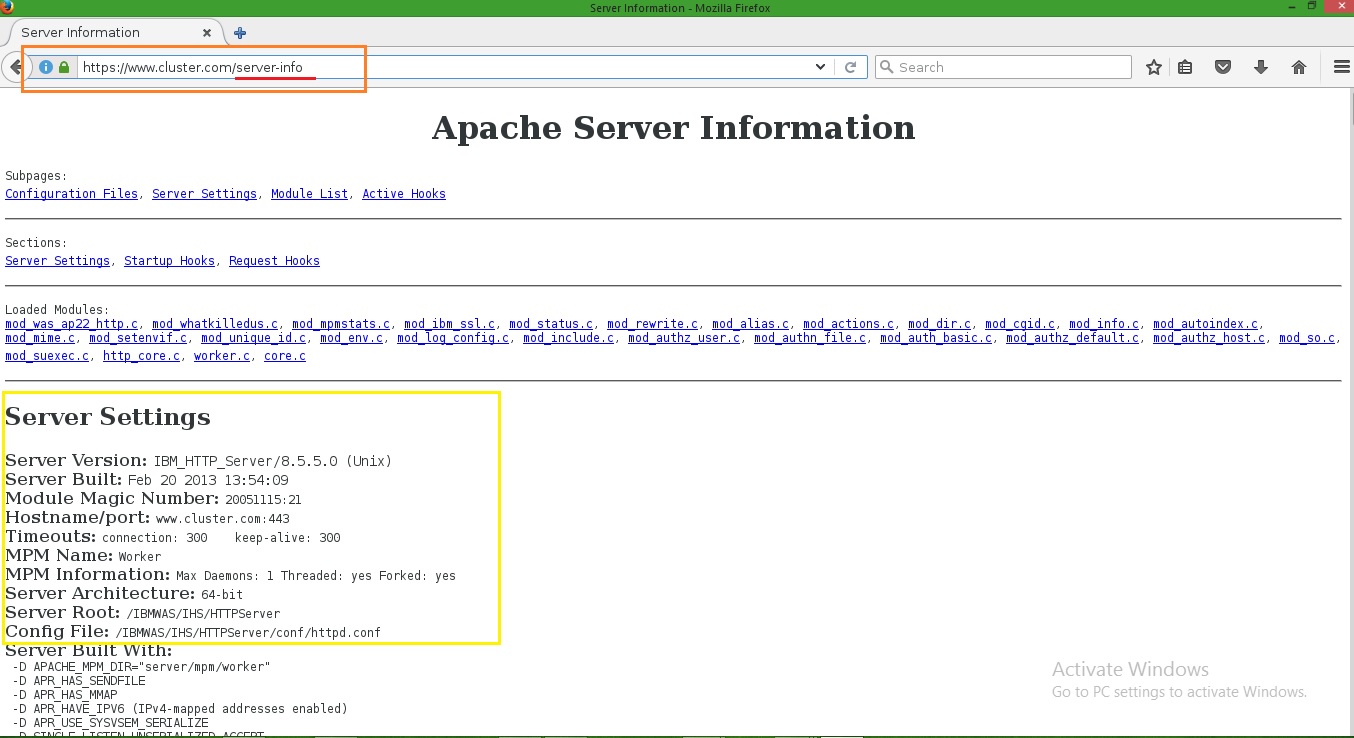
Step 8: Go to the browser and check Apache server-info

open URL : http://domain-name/server-info

Screenshot : 7


Reference Link : http://www-01.ibm.com/support/docview.wss?uid=swg21008489

Reference Link : http://www-01.ibm.com/support/docview.wss?uid=swg27035996&aid=1


Thanks :-)